
TAMS Biometric Device
The TAMS Biometric Device is an enterprise-ready, dual-technology (Fingerprint + RFID) attendance terminal. Designed for absolute reliability, it features seamless Bluetooth and WPA2-Enterprise WiFi connectivity. With built-in hardware timekeeping, automatic offline data caching, mid-lecture crash recovery, and full remote cloud management via OTA updates, it guarantees that you will never lose a single attendance record, no matter the network conditions.
TAMS bridges the gap between physical attendance and digital ERPs. It is the robust, "install-and-forget" solution for modern attendance management.
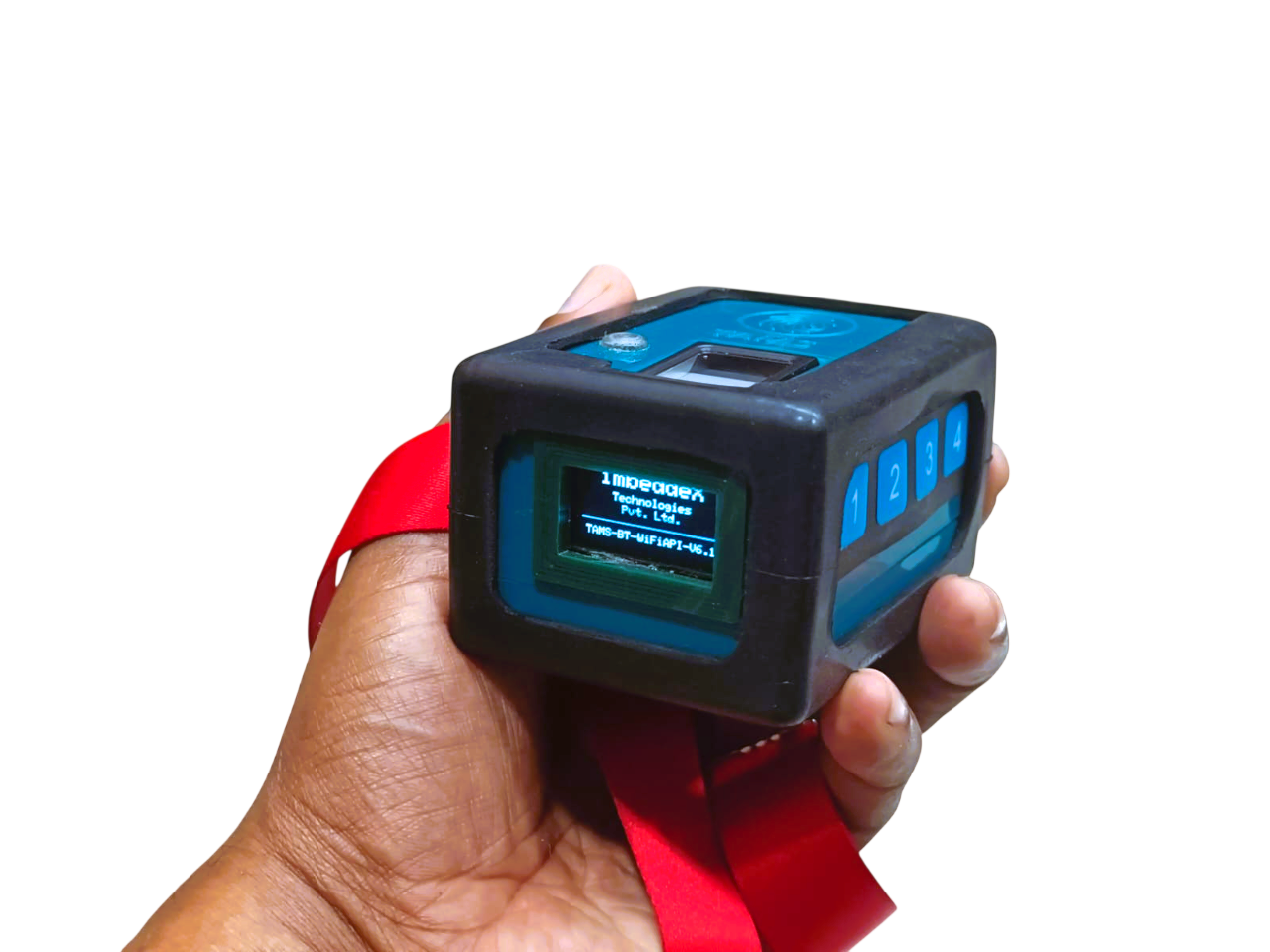
Device Features
Dual-Connectivity: Ultimate Deployment Flexibility
- Dual Operating Modes: The device can easily toggle between Bluetooth (BT) Mode and WiFi Cloud Mode.
- Bluetooth Companion Mode: Seamlessly pair the device with the TAMS Android Mobile App for mobile-driven attendance in areas without network infrastructure.
- Direct-to-Cloud WiFi Mode: Connects directly to the TAMS ERP web server to push attendance and pull commands autonomously.
- Enterprise-Grade WiFi Support: Unlike basic IoT devices, this system supports WPA2 Enterprise (Identity/Username + Password) out of the box, making it fully compatible with secure university and corporate networks.
Smart & Versatile Attendance Modes
- Live Attendance Mode: Instantly uploads scans to the cloud one by one—perfect for office check-ins or ongoing access control.
- Lecture/Classroom Mode: Specifically designed for education. A teacher authenticates to "open" a class, students scan their fingerprints/RFIDs, and the teacher authenticates again to "close" the session. The entire batch is then smartly packaged and uploaded together.
- Smart Duplicate Prevention: Built-in logic prevents students from scanning multiple times in the same lecture, eliminating duplicate records and saving cloud processing power.
- Multi-Modal Authentication: Supports both Optical Fingerprint Scanning (up to 1000 users) and RFID Card Tap-to-Scan (MFRC522), catering to different user preferences.
Unmatched Reliability & Offline Protection
- "Never Lose a Scan" Offline Storage: If the WiFi drops or the server is unreachable, the device automatically saves attendance data to its internal flash memory. Once the connection is restored, it auto-syncs the queued data to the ERP in the background.
- Intelligent Crash Recovery: Features a robust session-restore system. If the device loses power or crashes in the middle of a lecture, it remembers the teacher, the start time, and all the students who already scanned. Upon rebooting, it resumes the exact same session automatically!
- Precision Offline Timekeeping: Equipped with an onboard DS3231 Hardware Real-Time Clock (RTC). Even if the device has no internet for months, attendance records will always have the mathematically precise timestamp.
- Smart Storage Management: Continually monitors its own storage health. If the local storage ever gets completely full during extended offline periods, it will safely prune the oldest synced files to make room for new live data, preventing system freezes.
Zero-Touch Remote Management
- Over-The-Air (OTA) Updates: Firmware updates can be triggered directly from the TAMS web portal and downloaded seamlessly over WiFi, ensuring your devices always have the latest features without manual intervention.
- Cloud-Managed Biometrics (Batch Sync): Fingerprints enrolled on one device can be batch-downloaded to other devices via the cloud API.
- Remote Device Configuration: Administrators can change device settings instantly from the ERP dashboard. You can remotely update WiFi credentials, toggle the buzzer on/off, switch between Live/Lecture modes, or adjust fingerprint matching sensitivity.
- Remote Factory Reset & Wipes: Easily clear all fingerprints or factory reset device preferences securely from the cloud dashboard.
Intuitive User Experience & Hardware Features
- Crisp OLED Interface: Features a 128x64 OLED display that provides real-time feedback. It shows current mode (Live/Lecture, BT/WiFi), connected status, time, storage queue count, and clear Success/Fail messages.
- Dynamic Battery Fuel Gauge: An integrated battery monitoring chip gives highly accurate, smartphone-like battery percentage readings directly on the screen, along with automatic low-battery warnings.
- Audio-Visual Feedback: Equipped with a loud buzzer and a multi-color RGB LED. Users get instant visual and auditory confirmation (Green = Success, Red = Fail, Blue = Processing).
- "Silent Mode" Capability: The buzzer can be toggled off via the cloud or onboard keypad for quiet environments like libraries or exam halls, relying purely on the screen and LED.
Powering On & Hardware Controls
When the device is powered on, the OLED screen will display the imbeddeX Technologies splash screen along with the firmware version.
During the first few seconds of boot-up, you can use the onboard buttons to quickly toggle system settings without needing the cloud dashboard:
| Button | Function |
|---|---|
| KEY 1 | Beep Mode: Toggles the buzzer ON (Beeps during attendance) or OFF (Quietly takes attendance). |
| KEY 2 | Attendance Mode: Toggles between Live Mode (One-by-One) and Lecture Mode (Batch Class scanning). |
| KEY 3 | Device Mode: Toggles between Bluetooth Mode (Mobile App) and WiFi Mode (Direct to Cloud). |
| KEY 4 | Config Mode: Forces the device into Bluetooth Configuration Mode to set up WiFi credentials from a smartphone. |
| KEY 2 + 4 | Firmware Update: Forces the device to connect to a mobile hotspot (mobilewifi / passpass) to download emergency Over-The-Air (OTA) firmware updates. |
Choosing Your Operation Mode
The device operates in one of two primary networking modes:
A. Bluetooth Mode (Mobile Companion)
Used when there is no local WiFi. The device pairs with the TAMS Android App.
- Set the device to BT-MODE (using KEY 3).
- Open the TAMS Mobile App on your Android device and connect to the terminal.
- The device screen will change from
DISCONNECTEDtoCONNECTED. - Students or staff can now scan their fingerprints or RFID cards. The scanner instantly sends the IDs to the mobile app, which handles the cloud uploading.
B. WiFi Cloud Mode (Autonomous)
Used for permanent installations. The device connects directly to the TAMS ERP web server.
- Set the device to WIFI-MODE (using KEY 3).
- The device connects to the local WiFi and displays the signal strength.
- It syncs its internal clock with the global time server.
- It checks its internal memory and automatically uploads any offline attendance records saved during previous network outages.
Taking Attendance (WiFi Mode)
Once connected to WiFi, the actual attendance process depends on whether the device is set to Live or Lecture mode.
Scenario A: Live Mode (Offices / Library / Entry Gates)
Every scan is treated individually and uploaded instantly.
- Idle State: The screen displays
LIVE ATTENDANCE MODE - SCANNING... - Scan: A user places their finger on the scanner or taps their RFID card.
- Feedback: The device beeps, the LED flashes Green, and the screen shows
SUCCESS. - Upload: The device immediately pushes that single record to the cloud. If the network drops, it saves the record locally and shows
STORED LOCALLY.
Scenario B: Lecture Mode (Classrooms / Seminars)
Attendance is grouped into a single "Session" managed by a Teacher.
- Open Session: The screen displays
AUTHENTICATE TEACHER. The designated teacher scans their fingerprint or RFID card to open the lecture. - Student Collection: Screen changes to
STU Collection [0]. Students scan.- Success: Device flashes Green, beeps once, and increments the counter (e.g.,
STU Collection [1]). - Duplicate: If a student tries to scan twice in the same lecture, the device flashes Green twice, shows
DUPLICATEon screen, and ignores the scan. - Fail: If a finger is not recognized, it flashes Red and shows
FAIL!.
- Success: Device flashes Green, beeps once, and increments the counter (e.g.,
- Close Session: Once all students have scanned, the Teacher scans their fingerprint/RFID card again. The screen displays
TEACHER FOUND - CLOSED.
(Note: If the teacher forgets to close the session, the device will Auto-Close after 15 minutes of inactivity). - Upload: The device packages the teacher's ID, the start time, the end time, and all student scans into one file and uploads it to the ERP.
Exceptional Scenarios & Failsafes
Mid-Lecture Power Failure (Crash Recovery)
If someone kicks the power cable during a lecture, don't panic. When the device turns back on, it detects the interrupted session. The screen will say RESUMED LECTURE... and restore the teacher's ID, the exact start time, and all students who had already scanned. You can simply continue scanning.
Network Outage (Offline Storage)
If the WiFi goes down, the device continues to work seamlessly. It stores all Live Scans or Lecture Batches into its internal flash memory (displaying STORED LOCALLY).
Network Restoration (Auto-Sync)
As soon as the WiFi comes back online, you will see the screen change to UPLOADING [X]. It will automatically push all queued files to the ERP in the background without user intervention.
Administrator Functions (Zero-Touch)
As an administrator using the TAMS ERP dashboard, you do not need to touch the device to manage it. While the device is idle in WiFi mode, it constantly listens for your commands:
Sync Fingerprints
Click "Sync" on the web portal to push newly registered fingerprints down to the device.
Change Settings
You can remotely toggle the Buzzer, change it from Live to Lecture mode, or update its WiFi credentials from the web dashboard.
Firmware Updates
Click "Update" on the ERP. The device screen will change to OTA-UPDATE with a progress bar as it downloads the latest features and restarts itself.
Technical Specifications
Technical Details
Core Processing & Architecture
- Microcontroller: ESP32 (WiFi/BT & FreeRTOS)
- Framework: Arduino Core for ESP32
- OS: FreeRTOS (Background tasks, Watchdog)
Biometric Sensor (Fingerprint)
- Module Type: Optical/Capacitive
- Capacity: 1000 fingerprints
- Template Size: 512 bytes per fingerprint
Display
- Module Type: OLED
- Resolution: 128x64 pixels
RFID/NFC Reader
- Module Type: MFRC522 (13.56 MHz)
- UID Format: Hexadecimal string extraction
Real-Time Clock (RTC)
- Module Type: High-precision hardware RTC
- Sync Mechanism: Automatic NTP sync (pool.ntp.org, UTC) via WiFi
Power & Battery
- Battery: Rechargeable LiPo - 1800mAH
- Battery Life: Works for a full week on a single charge
- Management: Hardware cell percentage monitoring, low-battery trigger at <= 1%
Physical Specifications
- Design: Portable, small, lightweight, easy to carry and use
- Dimensions: 7.5 x 5.5 x 4.3 cm
- Weight: 150 grams
Connectivity & Network Protocols
WiFi Support (802.11 b/g/n)
- Supports standard WPA/WPA2 Personal.
- Enterprise WiFi: Fully supports WPA2-Enterprise (Requires Identity + Password).
Bluetooth
- Bluetooth Classic.
Cloud Communication
- Protocol: HTTP/HTTPS POST and GET.
- Authentication: Custom Header
X-Api-Key. - Data Format: JSON payloads.
Over-The-Air (OTA) Updates
- Secure HTTPS firmware downloads via
HTTPUpdate. - Streamed directly from
https://imbeddex.com/tams_ota/firmware.bin.
Ready to deploy?
Access the complete API documentation if you need to build a custom ERP integration.