
College attendance app for teachers and students
TAMS has three apps for Android and iOS. Teachers collect lecture-wise attendance, students see their own subject-wise percentage, and the office watches everything live on the web panel.
A personal attendance tracker is not a college attendance system
Many teachers already tick attendance in a notes app, a spreadsheet or a free attendance tracker. That works for one class, but the data stays on one phone. The office cannot see it, students cannot check it, and nothing stops a tick being added for a friend.
A college needs apps that share one live record.
- Attendance stuck on one teacher’s phone
- Students asking the office for their percentage
- No check that the student was in the room
- No link to the time table or the ERP
- Nothing reaches parents
Three apps, one live record
All three work from the same data as the web panel.
Attendance Collection app
Pairs with the TAMS device over Bluetooth, shows the live class list and collects fingerprint, RFID and face marks — even with no network.
Teachers App
All finalised lectures and every class’s attendance at a glance. Teachers can hand a lecture to a colleague and reply to student queries.
Students App
Own attendance by subject, face or code marking in the room, alerts, and queries to the office.
Location check
When a lecture has a location, a Students App punch must come from within about 50 metres of the classroom.
Offline-first
The apps keep every record until the network is back, then sync automatically.
TAMS Connect
A built-in help desk and notice board for the office, teachers and students — without the WhatsApp chaos.
For students, teachers and the classroom
Android and iOS. All three work from the same live data as the web panel.
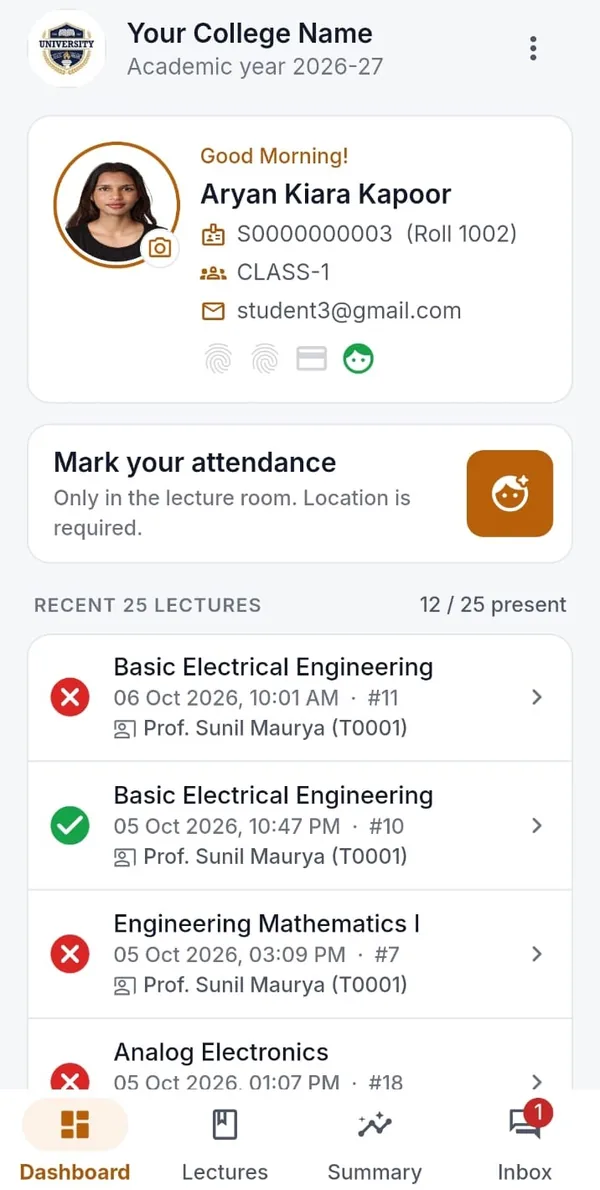
Students App
Own attendance by subject, face or code marking in the room, alerts and queries to the office.
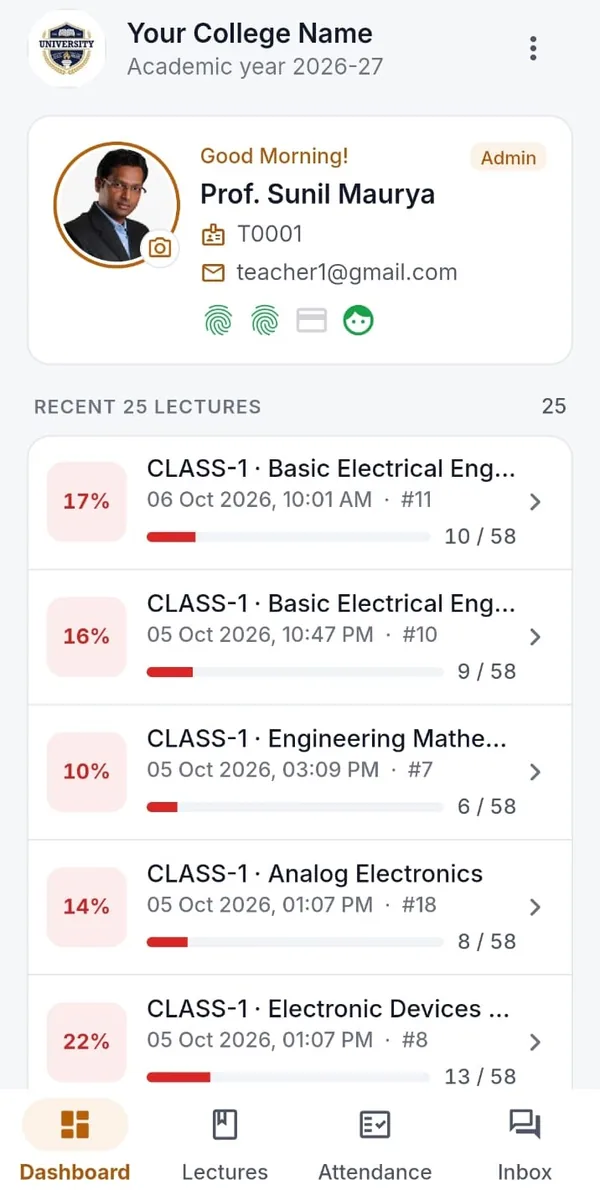
Teachers App
See all the finalised lectures, see every class’s attendance at a glance, reply to student queries.
Attendance App + device
Pairs with the TAMS device to collect fingerprint, RFID and face marks — even with no network.
How the three apps work together in one lecture
The teacher opens the Attendance Collection app, which pairs with the TAMS device over Bluetooth and shows the class list for the lecture on the time table. As the device goes around the class, names turn green on the teacher’s phone.
A student whose finger does not read can be marked by face in the same app, or — if the college allows it — mark from the Students App with a selfie or a lecture code, checked against the classroom location.
When the teacher finalises the lecture, the Students App shows each student their mark and their updated subject-wise percentage. Parents of absent students get an alert. The Teachers App adds the lecture to the teacher’s list, with the class percentage at a glance.
Colleges that want to start before devices arrive can run in device-less mode, using face match, lecture codes or manual marking in the apps. Every report, alert and dashboard works the same, and the device can be added later without changing anything else.
One minute in a lecture with TAMS
The device goes around the class, the app fills up, and the office sees it live.
Personal attendance tracker versus the TAMS apps
What changes when the app is part of a college-wide system.
| Personal attendance tracker app | TAMS apps | |
|---|---|---|
| Who sees the data | Only the person who entered it | Office, teachers, students and parents |
| Proof of presence | A tick by hand | Fingerprint, face match or location-checked code |
| Subject-wise percentage | Per phone | College-wide, live |
| Time table and ERP | Not connected | Connected |
| Alerts to parents | No | Automatic |
| Works offline | Usually | Yes, syncs later |
Trusted by universities and colleges across India
 IIT Bhubaneswar
 Arka Jain University
 Krupanidhi Group of Institutions
 Tuljaram Chaturchand College
 Silver Oak University
 Kadi Sarva Vishwavidyalaya
 COER University
 Kasturba Health Society
 Uni Trust Surajba Mahila Arts College
Questions colleges ask us
Is there an attendance app for college students?
Yes. The TAMS Students App for Android and iOS shows each student their attendance by subject, lets them mark by face or lecture code when the college allows it, and sends alerts.
Which app do teachers use to take attendance?
Teachers use the TAMS Attendance Collection app together with the handheld device, and the Teachers App to follow their lectures and classes.
Can a student mark attendance from outside the classroom?
When a lecture has a location, an app punch must come from within about 50 metres of the classroom, and the college can reject punches that have no location.
Can a teacher or student sign up on their own?
TAMS is set up for an institution, so the apps work with your college’s TAMS account. Ask your college office, or contact us to bring TAMS to your campus.
More about TAMS
- Biometric attendance for colleges
- Student attendance management system
- Lecture-wise attendance
- RFID attendance for students
- Face recognition attendance
- Attendance for universities
- Stop proxy attendance
- Guide: Biometric vs RFID vs face recognition attendance
- Guide: How to choose an attendance system for your college
- All TAMS features
- The TAMS device
- Apps & reports
See TAMS working in your own classroom.
Book a live demo or a no-obligation campus pilot. We bring the devices and set up a class, so you see real reports from your own students before you decide.