
Student attendance management system for colleges
TAMS is attendance management software built around the lecture. It captures attendance in the classroom, protects the record, and gives the office live reports, defaulter lists and parent alerts — on its own or alongside your ERP.
Registers and spreadsheets cannot manage attendance
Most colleges already record attendance. Managing it is the hard part: registers are typed into spreadsheets, percentages are worked out at the end of term, and defaulter lists arrive when it is too late to help the student.
An attendance management system should do the whole job: capture, verify, report, alert and protect the record.
- Registers typed into Excel by hand, weeks later
- Subject-wise percentages calculated at the end of term
- Defaulter lists that arrive after the damage is done
- No record of who changed a mark, or when
- Parents and mentors left out of the loop
One system, from the classroom to the principal’s desk
Capture is biometric or app-based. Everything after that is automatic.
Capture in the classroom
Fingerprint on the portable TAMS device, or face, RFID card, Bluetooth, lecture code or manual marking — the college chooses.
A report for every question
Lecture-wise, student-wise and class-wise reports, defaulters list, log sheets, teacher performance and lecture progress — with Excel export and print.
Early warning
Students absent several lecture days in a row, a forecast of who will fall below your minimum % by term end, and a teacher guardian for every student.
Alerts without effort
Absentee alerts and daily summaries to parents by app, WhatsApp, DLT-approved SMS or email — sent by the server.
Records you can defend
Device marks are final, every mark carries its source, old lectures lock, and every edit is logged with user and time.
Works with your ERP
Students, subjects, faculty and the time table come in from the ERP; every finalised lecture goes back live.
Live in the TAMS web panel
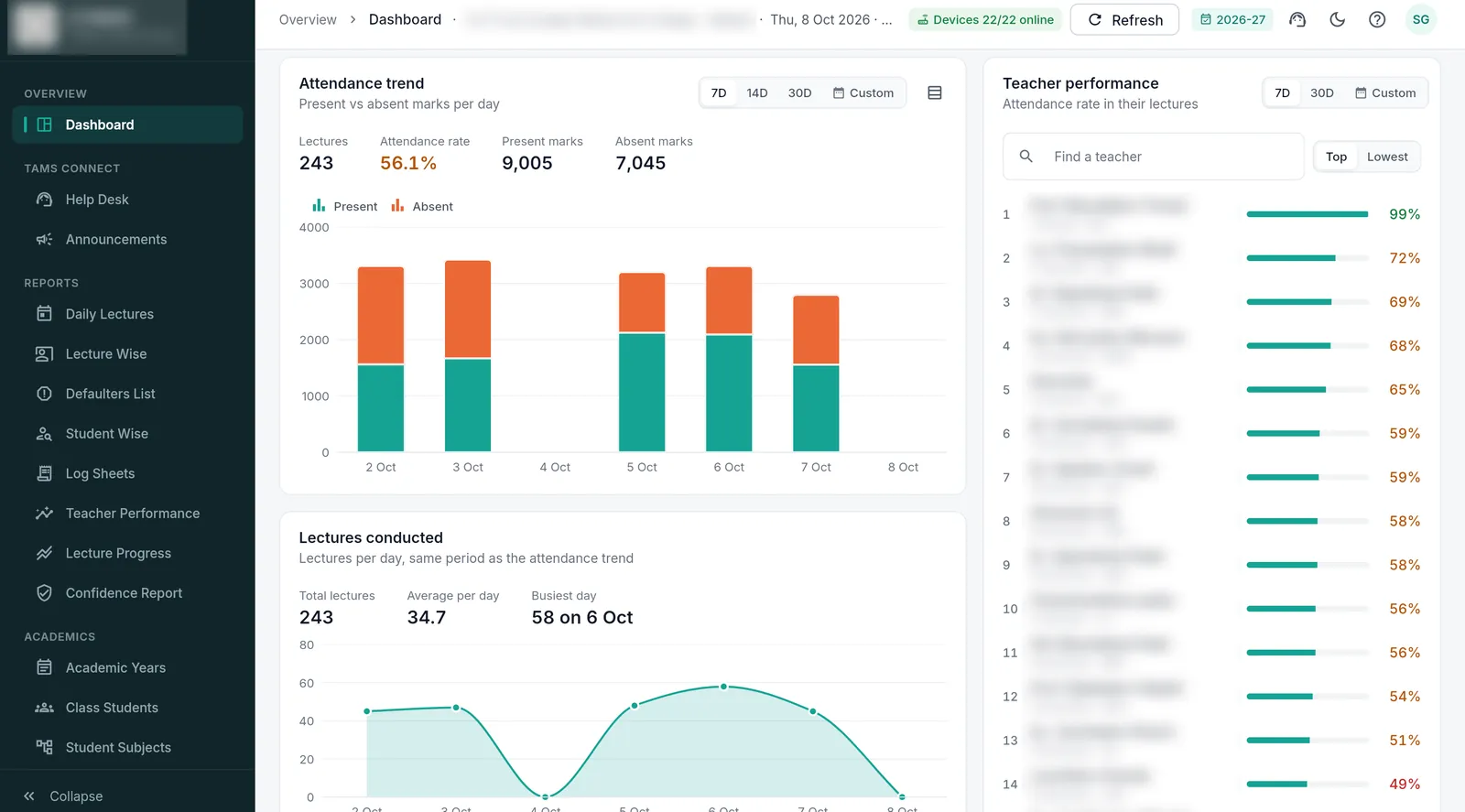
The dashboard: attendance trend, lectures conducted and teacher performance, updated live. (Names blurred for privacy.)
A day in the attendance office with TAMS
The day starts with the Insights summary, prepared overnight: attendance trends, the students forecast to fall below your minimum by the end of term, and the classes, days and periods where attendance is weakest.
The dashboard then lists students who have not come to college for several lecture days in a row. Each one has a teacher guardian, and the office can message the student or the parents in one click. Lectures appear in the panel as they are finalised, with the source of every mark.
When a student or teacher raises a query from the app — a missed mark, a wrong subject — it arrives in the help desk. The office answers it, corrects the record if needed, and the change is logged. Older lectures are locked, so corrections happen while memories are fresh.
At the end of the month, the defaulters list, class-wise percentages and printable log sheets are already up to date. Nothing has to be typed in, and the same numbers are in the ERP.
Register, ERP module or attendance management system?
Three common ways colleges manage student attendance.
| Paper register + Excel | Attendance screen in a general ERP | TAMS | |
|---|---|---|---|
| How attendance is captured | Roll call, typed in later | Usually typed in by the teacher | Biometric or app, inside the lecture |
| Proxy protection | None | Usually none | Fingerprint; every mark labelled |
| Subject-wise % and defaulters | End of term | Depends on data entry | Live |
| Parent alerts | No | Varies | Automatic, same day |
| Audit trail | No | Varies | Edit locks and access logs |
| Works offline | Yes | Rarely | Yes, syncs later |
Trusted by universities and colleges across India
 IIT Bhubaneswar
 Arka Jain University
 Krupanidhi Group of Institutions
 Tuljaram Chaturchand College
 Silver Oak University
 Kadi Sarva Vishwavidyalaya
 COER University
 Kasturba Health Society
 Uni Trust Surajba Mahila Arts College
Questions colleges ask us
What is a student attendance management system?
Software that records which students attended each lecture and turns it into subject-wise percentages, defaulter lists, reports and alerts. TAMS adds biometric capture in the classroom, so the data it manages can be trusted.
Can TAMS be used as attendance software without the fingerprint device?
Yes. TAMS also runs in a device-less mode using the mobile apps — face match, lecture code or manual marking — and every report, alert and dashboard works the same. Many institutions start this way.
Does it replace our college ERP?
No. TAMS works alongside your ERP. Academic data flows in and verified attendance flows out, so both systems show the same numbers.
More about TAMS
- Biometric attendance for colleges
- Lecture-wise attendance
- College attendance app
- RFID attendance for students
- Face recognition attendance
- Attendance for universities
- Stop proxy attendance
- Guide: Biometric vs RFID vs face recognition attendance
- Guide: How to choose an attendance system for your college
- All TAMS features
- The TAMS device
- Apps & reports
See TAMS working in your own classroom.
Book a live demo or a no-obligation campus pilot. We bring the devices and set up a class, so you see real reports from your own students before you decide.